JVM(java virtual machine)相关知识(part 2 常用JVM配置参数)
- new generation(新生代)
- eden(伊甸园,对象出生的地方)
- from(对等to幸存代)S0
- to(对等from幸存代)S1
- tenured generation(老年代)
Trace跟踪参数
可以打印GC的简要信息
[GC 4790K->374K(15872K), 0.0001606 secs]
[GC 4790K->374K(15872K), 0.0001474 secs]
[GC 4790K->374K(15872K), 0.0001563 secs]
[GC 4790K->374K(15872K), 0.0001682 secs]
- -XX:+PrintGCDetails
打印GC详细信息
- -XX:+PrintGCTimeStamps
打印CG发生的时间戳
例
[GC[DefNew: 4416K->0K(4928K), 0.0001897 secs] 4790K->374K(15872K),
 0.0002232 secs] [Times: user=0.00 sys=0.00, real=0.00 secs]
Heap
                                                 低边界       当前边界      最高边界
 def new generation   total 13824K, used 11223K [0x27e80000, 0x28d80000, 0x28d80000)
  eden space 12288K,  91% used [0x27e80000, 0x28975f20, 0x28a80000)
  from space 1536K,   0% used [0x28a80000, 0x28a80000, 0x28c00000)
  to   space 1536K,   0% used [0x28c00000, 0x28c00000, 0x28d80000)
 tenured generation   total 5120K, used 0K [0x28d80000, 0x29280000, 0x34680000)
   the space 5120K,   0% used [0x28d80000, 0x28d80000, 0x28d80200, 0x29280000)
 compacting perm gen  total 12288K, used 142K [0x34680000, 0x35280000, 0x38680000)
   the space 12288K,   1% used [0x34680000, 0x346a3a90, 0x346a3c00, 0x35280000)
    ro space 10240K,  44% used [0x38680000, 0x38af73f0, 0x38af7400, 0x39080000)
    rw space 12288K,  52% used [0x39080000, 0x396cdd28, 0x396cde00, 0x39c80000)
- -Xloggc:log/gc.log
指定GC log的位置,以文件输出
帮助开发人员分析问题
- -XX:+PrintHeapAtGC
每次一次GC后,都打印堆信息
Heap before GC invocations=0 (full 0):
 def new generation   total 3072K, used 2752K [0x33c80000, 0x33fd0000, 0x33fd0000)
  eden space 2752K, 100% used [0x33c80000, 0x33f30000, 0x33f30000)
  from space 320K,   0% used [0x33f30000, 0x33f30000, 0x33f80000)
  to   space 320K,   0% used [0x33f80000, 0x33f80000, 0x33fd0000)
 tenured generation   total 6848K, used 0K [0x33fd0000, 0x34680000, 0x34680000)
   the space 6848K,   0% used [0x33fd0000, 0x33fd0000, 0x33fd0200, 0x34680000)
 compacting perm gen  total 12288K, used 143K [0x34680000, 0x35280000, 0x38680000)
   the space 12288K,   1% used [0x34680000, 0x346a3c58, 0x346a3e00, 0x35280000)
    ro space 10240K,  44% used [0x38680000, 0x38af73f0, 0x38af7400, 0x39080000)
    rw space 12288K,  52% used [0x39080000, 0x396cdd28, 0x396cde00, 0x39c80000)

[GC[DefNew: 2752K->320K(3072K), 0.0014296 secs] 2752K->377K(9920K), 0.0014604 secs] [Times: user=0.00 sys=0.00, real=0.00 secs]

Heap after GC invocations=1 (full 0):
 def new generation   total 3072K, used 320K [0x33c80000, 0x33fd0000, 0x33fd0000)
  eden space 2752K,   0% used [0x33c80000, 0x33c80000, 0x33f30000)
  from space 320K, 100% used [0x33f80000, 0x33fd0000, 0x33fd0000)
  to   space 320K,   0% used [0x33f30000, 0x33f30000, 0x33f80000)
 tenured generation   total 6848K, used 57K [0x33fd0000, 0x34680000, 0x34680000)
   the space 6848K,   0% used [0x33fd0000, 0x33fde458, 0x33fde600, 0x34680000)
 compacting perm gen  total 12288K, used 143K [0x34680000, 0x35280000, 0x38680000)
   the space 12288K,   1% used [0x34680000, 0x346a3c58, 0x346a3e00, 0x35280000)
    ro space 10240K,  44% used [0x38680000, 0x38af73f0, 0x38af7400, 0x39080000)
    rw space 12288K,  52% used [0x39080000, 0x396cdd28, 0x396cde00, 0x39c80000)
监控类的加载
[Loaded java.lang.Object from shared objects file]
[Loaded java.io.Serializable from shared objects file]
[Loaded java.lang.Comparable from shared objects file]
[Loaded java.lang.CharSequence from shared objects file]
[Loaded java.lang.String from shared objects file]
[Loaded java.lang.reflect.GenericDeclaration from shared objects file]
[Loaded java.lang.reflect.Type from shared objects file]
按下Ctrl+Break后,打印类的信息:
num     #instances         #bytes  class name
----------------------------------------------
  1:        890617      470266000  [B
  2:        890643       21375432  java.util.HashMap$Node
  3:        890608       14249728  java.lang.Long
  4:            13        8389712  [Ljava.util.HashMap$Node;
  5:          2062         371680  [C
  6:           463          41904  java.lang.Class
分别显示:序号、实例数量、总大小、类型
-Xmx20m -Xms5m  运行代码:
System.out.print("Xmx=");
System.out.println(Runtime.getRuntime().maxMemory()/1024.0/1024+"M");

System.out.print("free mem=");
System.out.println(Runtime.getRuntime().freeMemory()/1024.0/1024+"M");

System.out.print("total mem=");
System.out.println(Runtime.getRuntime().totalMemory()/1024.0/1024+"M");

Xmx=19.375M
free mem=4.342750549316406M
total mem=4.875M
--------------------------------------------
-Xmx20m -Xms5m  运行代码
byte[] b=new byte[1*1024*1024];
System.out.println("分配了1M空间给数组");

System.out.print("Xmx=");
System.out.println(Runtime.getRuntime().maxMemory()/1024.0/1024+"M");

System.out.print("free mem=");
System.out.println(Runtime.getRuntime().freeMemory()/1024.0/1024+"M");

System.out.print("total mem=");
System.out.println(Runtime.getRuntime().totalMemory()/1024.0/1024+"M");

分配了1M空间给数组
Xmx=19.375M
free mem=3.4791183471679688M
total mem=4.875M
----------------------------------------------
-Xmx20m -Xms5m  运行代码
b=new byte[4*1024*1024];
System.out.println("分配了4M空间给数组");

System.out.print("Xmx=");
System.out.println(Runtime.getRuntime().maxMemory()/1024.0/1024+"M");

System.out.print("free mem=");
System.out.println(Runtime.getRuntime().freeMemory()/1024.0/1024+"M");

System.out.print("total mem=");
System.out.println(Runtime.getRuntime().totalMemory()/1024.0/1024+"M");

分配了4M空间给数组
Xmx=19.375M
free mem=3.5899810791015625M
total mem=9.00390625M

--------------------------------------------------------
-Xmx20m -Xms5m  运行代码
System.gc();

System.out.println("回收内存");
System.out.print("Xmx=");
System.out.println(Runtime.getRuntime().maxMemory()/1024.0/1024+"M");

System.out.print("free mem=");
System.out.println(Runtime.getRuntime().freeMemory()/1024.0/1024+"M");

System.out.print("total mem=");
System.out.println(Runtime.getRuntime().totalMemory()/1024.0/1024+"M");

回收内存
Xmx=19.375M
free mem=6.354591369628906M
total mem=10.75390625M
- -Xmn
设置新生代大小
- -XX:NewRatio
新生代(eden+2*s)和老年代(不包含永久区)的比值
4 表示 新生代:老年代=1:4,即年轻代占堆的1/5
- -XX:SurvivorRatio
设置两个Survivor区和eden的比
8表示 两个Survivor :eden=2:8,即一个Survivor占年轻代的1/10
例子
jvm参数1:
-Xmx20m -Xms20m -Xmn1m -XX:+PrintGCDetails
public static void main(String[] args) {
   byte[] b=null;
   for(int i=0;i<10;i++)
       b=new byte[1*1024*1024];
}
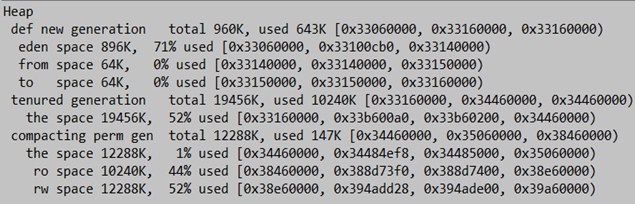
结果:
1、没有触发GC
2、全部分配在老年代
jvm参数2:
-Xmx20m -Xms20m -Xmn15m -XX:+PrintGCDetails
public static void main(String[] args) {
   byte[] b=null;
   for(int i=0;i<10;i++)
       b=new byte[1*1024*1024];
}
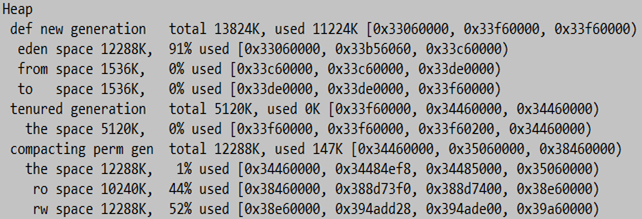
结果:
1、没有触发GC
2、全部分配在eden
3、老年代没有使用
jvm参数3:
-Xmx20m -Xms20m –Xmn7m -XX:+PrintGCDetails
public static void main(String[] args) {
   byte[] b=null;
   for(int i=0;i<10;i++)
       b=new byte[1*1024*1024];
}

结果:
1.进行了2次新生代GC
2.s0 s1 太小需要老年代担保
jvm参数4:
-Xmx20m -Xms20m -Xmn7m -XX:SurvivorRatio=2 -XX:+PrintGCDetails
public static void main(String[] args) {
   byte[] b=null;
   for(int i=0;i<10;i++)
       b=new byte[1*1024*1024];
}
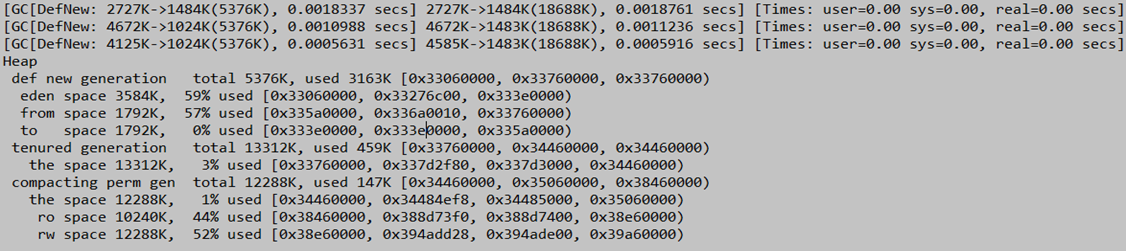
结果:
1.进行了3次新生代GC
2.s0 s1 增大
jvm参数5:
-Xmx20m -Xms20m -XX:NewRatio=1
-XX:SurvivorRatio=2 -XX:+PrintGCDetails
public static void main(String[] args) {
   byte[] b=null;
   for(int i=0;i<10;i++)
       b=new byte[1*1024*1024];
}

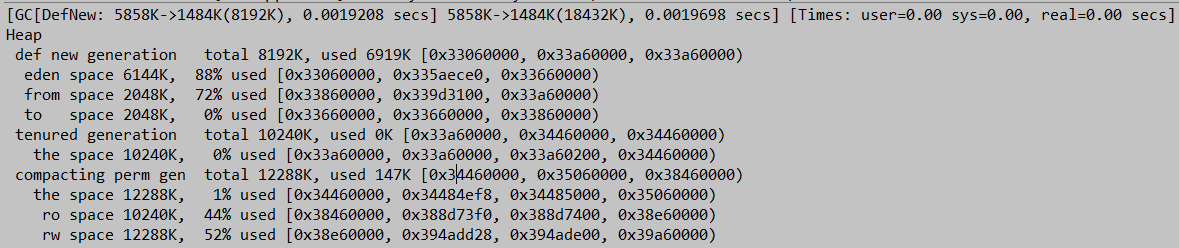
jvm参数6:
-Xmx20m -Xms20m -XX:NewRatio=1
-XX:SurvivorRatio=3 -XX:+PrintGCDetails
public static void main(String[] args) {
   byte[] b=null;
   for(int i=0;i<10;i++)
       b=new byte[1*1024*1024];
}
- -XX:+HeapDumpOnOutOfMemoryError
OOM时导出堆到文件
- -XX:+HeapDumpPath
导出OOM的路径
-Xmx20m -Xms5m -XX:+HeapDumpOnOutOfMemoryError
-XX:HeapDumpPath=d:/a.dump
 Vector v=new Vector();
        for(int i=0;i<25;i++)
            v.add(new byte[1*1024*1024]);
在OOM时,执行一个脚本
"-XX:OnOutOfMemoryError=D:/tools/jdk1.7_40/bin/printstack.bat %p"
当程序OOM时,在D:/a.txt中将会生成线程的dump
可以在OOM时,发送邮件,甚至是重启程序

printstack.bat
D:/tools/jdk1.7_40/bin/jstack -F %1 > D:/a.txt
堆的分配参数 – 总结
根据实际事情调整新生代和幸存代的大小
官方推荐新生代占堆的3/8
幸存代占新生代的1/10
在OOM时,记得Dump出堆,确保可以排查现场问题
永久区分配参数
- -XX:PermSize -XX:MaxPermSize
设置永久区的初始空间和最大空间
他们表示,一个系统可以容纳多少个类型
使用CGLIB等库的时候,可能会产生大量的类,这些类,有可能撑爆永久区导致OOM
for(int i=0;i<100000;i++){
    CglibBean bean = new CglibBean("geym.jvm.ch3.perm.bean"+i,new HashMap());
}
不断产生新的类
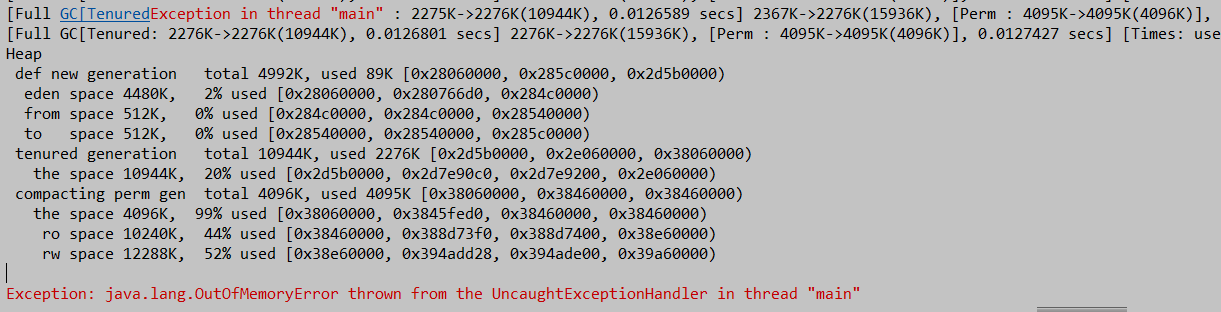
- 打开堆的Dump
堆空间实际占用非常少
但是永久区溢出 一样抛出OOM
 如果堆空间没有用完也抛出了OOM,有可能是永久区导致的
栈大小分配
- -Xss
通常只有几百K
决定了函数调用的深度
每个线程都有独立的栈空间
局部变量、参数 分配在栈上
public class TestStackDeep {
	private static int count=0;
	public static void recursion(long a,long b,long c){
		long e=1,f=2,g=3,h=4,i=5,k=6,q=7,x=8,y=9,z=10;
		count++;
		recursion(a,b,c);
	}
	public static void main(String args[]){
		try{
			recursion(0L,0L,0L);
		}catch(Throwable e){
			System.out.println("deep of calling = "+count);
			e.printStackTrace();
		}
	}
}


递归调用
-Xss128K
deep of calling = 701
java.lang.StackOverflowError

-Xss256K
deep of calling = 1817
java.lang.StackOverflowError
